Withdrawals
- Create a pending transaction on your system.
- Create and commit a payment transaction on Xprizo and wait for the response. Transaction/SendPayment
- If you receive an Ok Response (200), then the transaction was successfully processed and you can set your payment transaction as completed.
- If you receive one of the following error codes (400,401,403,500), then the transaction did not complete and you should cancel your transaction (or correct the problem and try again).
- If you do not receive a response from Xprizo or a timeout you will need to keep checking Xprizo until you can determine the status of the transaction. Transaction/Status
- Check transaction status
- Active - Approved
- Pending – Pending approval
- NotFound – Timed-out or cancelled
Create, Approve, Check
Use this method if the creation and approval of transactions are not done at the same time. For instance, the platform might initiate the transaction, and the merchant may approve the transaction
With this method, the platform needs to continuously poll Xprizo in case there's no immediate response from Xprizo to confirm whether the transaction was successfully created or not.
Flow
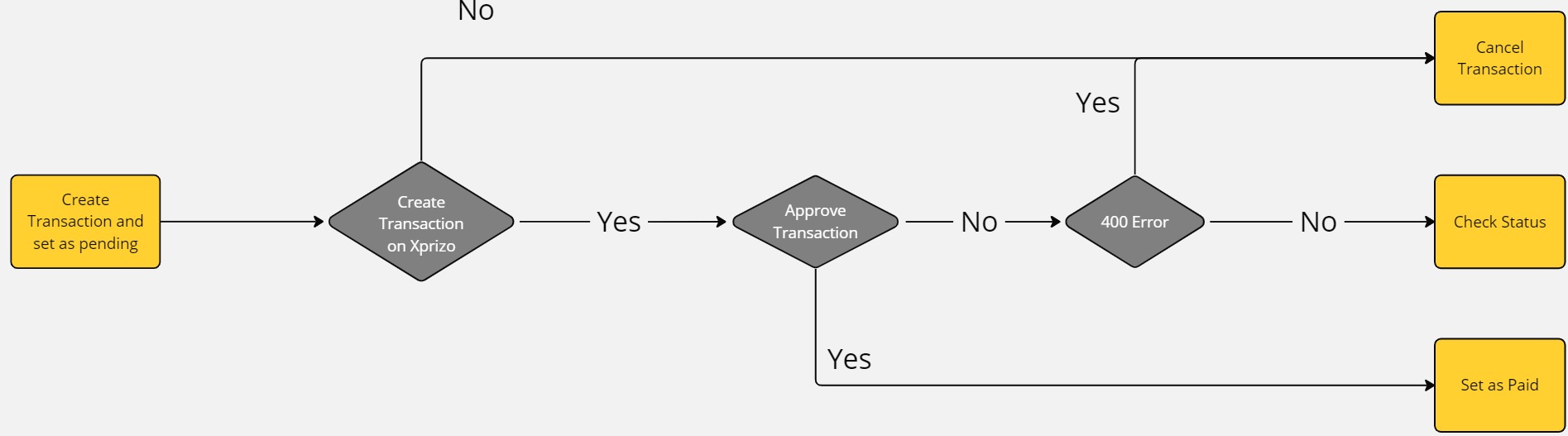
Steps
- Create a pending transaction on your system.
- Create a payment transaction on Xprizo and wait for the response. Transaction/SendPayment
- Use the key from the returned response to approve the transaction Transaction/Approval or wait for the merchant to approve the transaction (you can only approve the transaction if the merchant gave you full or approval rights to their wallet).
- If you are approving the transaction
- If you get an OK Response (200) then you should check the status of the transaction. Transaction/Status
- If you will wait for the merchant to approve the transaction
- and you have set the approval callback option in your settings Preference/SetApprovalWebhook then you will receive a callback once the transaction has been approved
- and you have NOT set the approval callback option then you will have to keep checking the status of the transaction until it is approved, rejected or expires. Transaction/Status
At any time you can cancel the transaction by calling Transaction/Cancel
Create, Hold, Check
Use this method if you prefer Xprizo to conduct the final check. Xprizo will verify that the transaction has been created on the platform by sending a callback and awaiting a valid response. Depending on the platform's response, Xprizo will either confirm the transaction or cancel it.
By using this method involves Xprizo initiating a transaction and placing it on hold. It will then send a callback to verify whether the platform has successfully updated the transaction on its end. If Xprizo receives a positive response, then the transaction will be completed. If a negative response is received or there is no response within 24 hours, the transaction is voided.
Flow

Steps
- Create a pending transaction on your system
- Create a payment transaction on Xprizo and wait for the response. Transaction/SendPayment
- Xprizo will create a transaction marked as ‘Hold’ and return 200 (success)
- If you get the 200 (success) response then leave your transaction as pending
- If the transaction failed with any error 400,401,403,500 excluding a timeout mark the transaction as rejected (Xprizo automatically deleted failed transactions)
- Xprizo will a send callback to the platform (make sure you have the "Payment Webhook" setup in Xprizo) Preference/SetApprovalWebhook.
- You should now set the transaction on your platform as paid and respond to the callback with 200 (success) response.
- It is recommended to check the status of the transaction on Xprizo to ensure that is completed Transaction/Status.
- Xprizo will keep sending callbacks until the platform responds
- If your platform does not response for 24 hours
- The transaction is voided
- Funds released back to the merchant
- If the platform responds with a success
- The Hold is removed and the transaction is marked as active
- If the platform responds with an error
- The transaction is voided
- Funds released back to the merchant
Withdrawal to Bank Account
When a user needs to transfer funds from their wallet to someone's bank account, they can easily initiate this process by providing the recipient's name, account number, and the desired amount to be transferred. This withdrawal method facilitates direct transfers to bank accounts, ensuring seamless transactions between users and their chosen recipients.
Flow
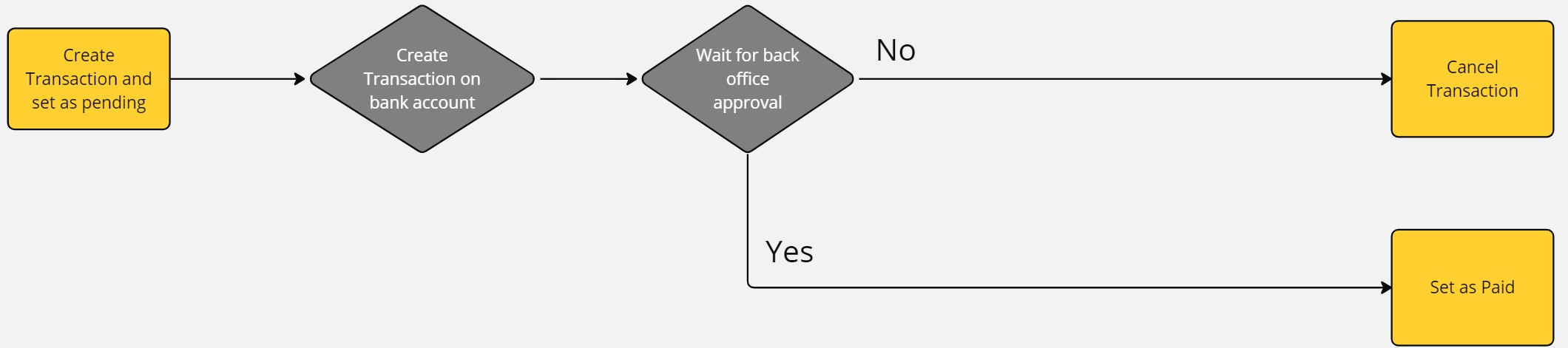
Steps
- Create a pending transaction on your system.
- Create a withdrawal request on Xprizo using this endpoint Transaction/BankWithdrawal
- After this the entered amount will be debited from your Xprizo wallet and the withdrawal will be created as a Hold transaction. This Hold transaction will be reviewed by the back office for approval.
- If the back office user
- approves of the transaction will go into the processing and after the successful processing this transaction will be marked as Active and the user will be notified using your approval webhook. You can configure your approval webhook using this Preference/SetApprovalWebhook.
- rejects the transaction the amount deducted will be reverted back to the user's wallet and the transaction will be marked as Void.
- and you have NOT set the approval callback option then you will have to keep checking the status of the transaction until it is approved, rejected, or expires. Transaction/Status