# How to do Withdrawal using Agent Wallet?

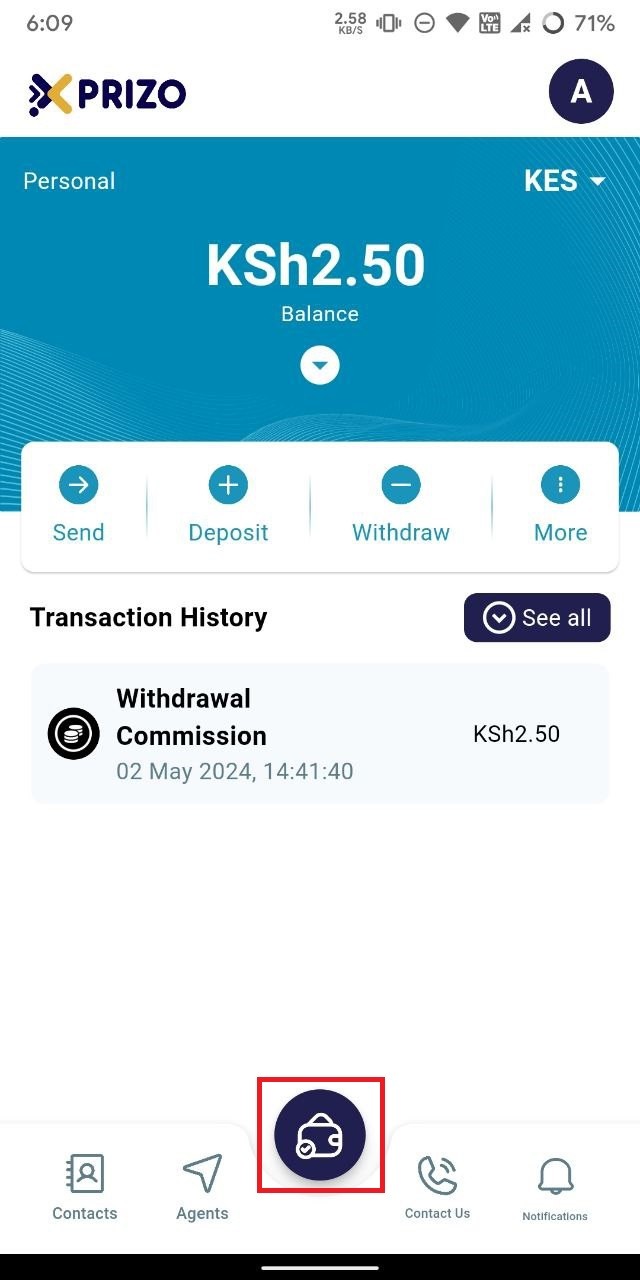
- Sign in to your account using your credentials, then click on the wallet icon at the bottom to switch between different types of wallets.
    
    <div class="w-full text-token-text-primary" data-scroll-anchor="false" data-testid="conversation-turn-1008" dir="auto"><div class="py-2 px-3 text-base md:px-4 m-auto md:px-5 lg:px-1 xl:px-5"><div class="mx-auto flex flex-1 gap-3 text-base juice:gap-4 juice:md:gap-6 md:max-w-3xl lg:max-w-[40rem] xl:max-w-[48rem]"><div class="flex-shrink-0 flex flex-col relative items-end"><div><div class="pt-0.5"><div class="gizmo-shadow-stroke flex h-6 w-6 items-center justify-center overflow-hidden rounded-full">  
    </div></div></div></div></div></div></div>

![photo1714717396.jpeg](https://books.xprizo.com/uploads/images/gallery/2024-05/scaled-1680-/TQTphoto1714717396.jpeg)

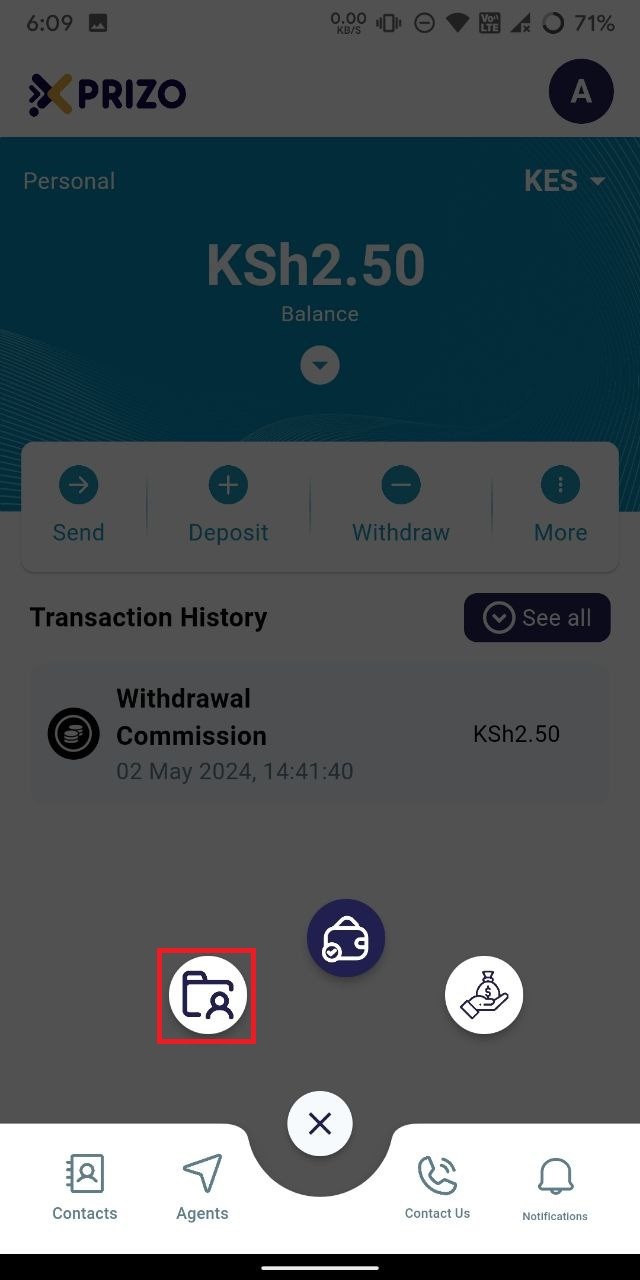
- Tap the "Agent Wallet" button to transition from your current wallet to your agent wallet.
    
    <div class="w-full text-token-text-primary" data-scroll-anchor="false" data-testid="conversation-turn-1010" dir="auto"><div class="py-2 px-3 text-base md:px-4 m-auto md:px-5 lg:px-1 xl:px-5"><div class="mx-auto flex flex-1 gap-3 text-base juice:gap-4 juice:md:gap-6 md:max-w-3xl lg:max-w-[40rem] xl:max-w-[48rem]"><div class="flex-shrink-0 flex flex-col relative items-end"><div><div class="pt-0.5"><div class="gizmo-shadow-stroke flex h-6 w-6 items-center justify-center overflow-hidden rounded-full">  
    </div></div></div></div></div></div></div>

![photo1714717396 (1).jpeg](https://books.xprizo.com/uploads/images/gallery/2024-05/scaled-1680-/photo1714717396-1.jpeg)

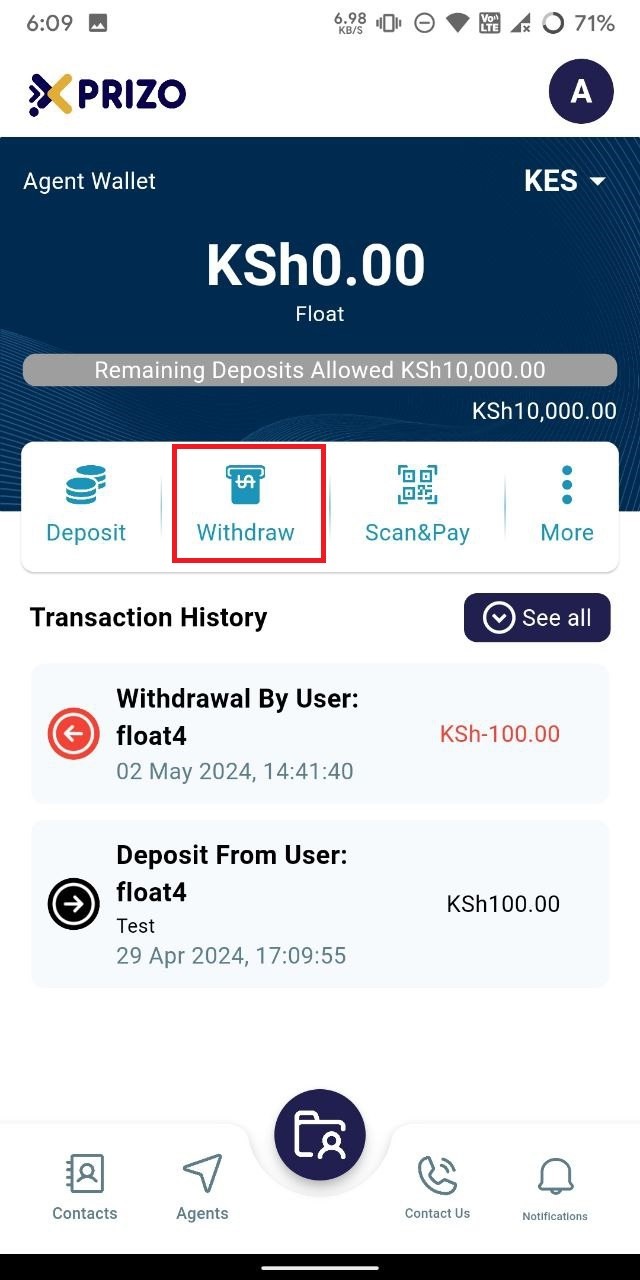
- Select the "Withdraw" button to dispense funds physically to the user, who will be paying from their digital wallet.
    
    <div class="w-full text-token-text-primary" data-scroll-anchor="false" data-testid="conversation-turn-1012" dir="auto"><div class="py-2 px-3 text-base md:px-4 m-auto md:px-5 lg:px-1 xl:px-5"><div class="mx-auto flex flex-1 gap-3 text-base juice:gap-4 juice:md:gap-6 md:max-w-3xl lg:max-w-[40rem] xl:max-w-[48rem]"><div class="flex-shrink-0 flex flex-col relative items-end"><div><div class="pt-0.5"><div class="gizmo-shadow-stroke flex h-6 w-6 items-center justify-center overflow-hidden rounded-full">  
    </div></div></div></div></div></div></div>

![photo1714717396 (7).jpeg](https://books.xprizo.com/uploads/images/gallery/2024-05/scaled-1680-/photo1714717396-7.jpeg)

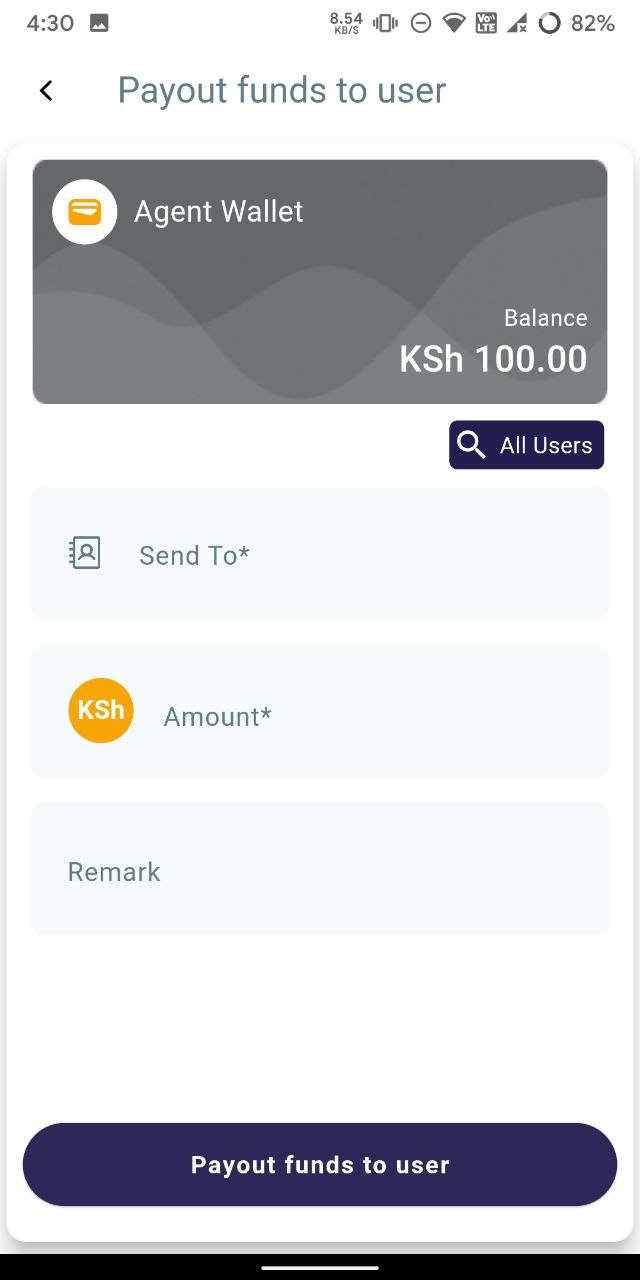
- If the user is in your contact list, enter their name; if not, search for them using the "All users" button. Input the amount the user wishes to withdraw in physical currency, and optionally add a remark. Finally, click on "Payout funds to user" to initiate the withdrawal.
    
    <div class="w-full text-token-text-primary" data-scroll-anchor="false" data-testid="conversation-turn-1014" dir="auto"><div class="py-2 px-3 text-base md:px-4 m-auto md:px-5 lg:px-1 xl:px-5"><div class="mx-auto flex flex-1 gap-3 text-base juice:gap-4 juice:md:gap-6 md:max-w-3xl lg:max-w-[40rem] xl:max-w-[48rem]"><div class="flex-shrink-0 flex flex-col relative items-end"><div><div class="pt-0.5"><div class="gizmo-shadow-stroke flex h-6 w-6 items-center justify-center overflow-hidden rounded-full">  
    </div></div></div></div></div></div></div>

![photo1714734024.jpeg](https://books.xprizo.com/uploads/images/gallery/2024-05/scaled-1680-/photo1714734024.jpeg)

- Once clicked, the user will have a pending transaction that they will need to approve.
    
    <div class="w-full text-token-text-primary" data-scroll-anchor="false" data-testid="conversation-turn-1016" dir="auto"><div class="py-2 px-3 text-base md:px-4 m-auto md:px-5 lg:px-1 xl:px-5"><div class="mx-auto flex flex-1 gap-3 text-base juice:gap-4 juice:md:gap-6 md:max-w-3xl lg:max-w-[40rem] xl:max-w-[48rem]"><div class="flex-shrink-0 flex flex-col relative items-end"><div><div class="pt-0.5"><div class="gizmo-shadow-stroke flex h-6 w-6 items-center justify-center overflow-hidden rounded-full">  
    </div></div></div></div></div></div></div>

- Upon approval from the user, the money will be deducted from their wallet. Similarly, the same amount will be deducted from the agent's wallet as the agent is providing physical cash to the user.
    
    <div class="w-full md:pt-0 dark:border-white/20 md:border-transparent md:dark:border-transparent md:w-[calc(100%-.5rem)] juice:w-full"><div class="px-3 text-base md:px-4 m-auto md:px-5 lg:px-1 xl:px-5"><div class="mx-auto flex flex-1 gap-3 text-base juice:gap-4 juice:md:gap-6 md:max-w-3xl lg:max-w-[40rem] xl:max-w-[48rem]"><form class="w-full"></form>  
    </div></div></div>